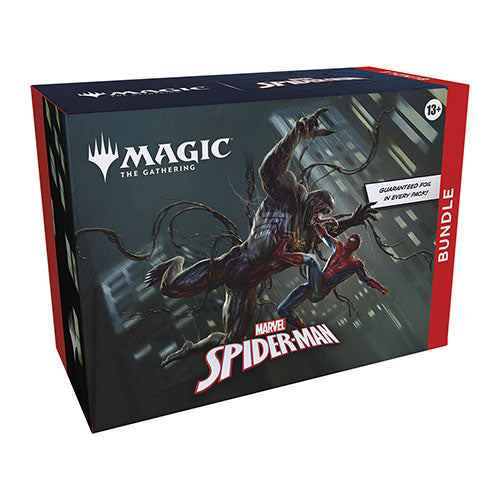
Your friendly neighbourhood Spider-Man swings into Magic: The Gathering, and not a moment too soon! Gather web-slingers from across the Spider-Verse and team up to take down the sinister foes that threaten the city. Keep your Spider-Senses primed to spot Borderless treatments that leap right off the page!
The Bundle is a great gift for Spider-Man superfans and newcomers alike who visit your store. They contain a little bit of everything to get a player's collection off the ground, plus an oversized Spindown life counter themed after the set.
Features: • Gather web-slingers from across the Spider-Verse and team up to take down the sinister foes that threaten the city. • Keep your Spider-Senses primed to spot Borderless treatments that leap right off the page • The Bundle is a great gift for Magic superfans visiting your store.
Contents: • 9 x Marvel Spiderman Play Boosters (14 Cards Per Booster) • 30 x Basic Land Cards (15 Foil & 15 Nonfoil) • 1 x Spindown Life Counter • 2 x Reference Cards • 1 x Card Box
Couldn't load pickup availability
We’ll email you as soon as this option is back in stock.
Thistle Tavern isn't just a shop; it's a hub for the TCG community across Scotland. Run and operated by active players, we are dedicated to building and supporting local gaming scenes in Aberdeen and Edinburgh. Every product we sell helps fund local events, player meetups, and the growth of the games we love. When you shop with us, you're supporting a team that's as passionate about the local meta as you are.
Player-Owned & Operated
Supporting Scottish Metas
Community-Driven Events
Support for Every Planeswalker
From Commander nights to local drafts, Magic: The Gathering is a fundamental part of our community in Aberdeen and Edinburgh. Thistle Tavern is run by players who have been planeswalking for years, and we're committed to supporting the diverse MTG scene across Scotland.
Player-Run MTG Stock
Commander & Casual Focus
Decades of Game Experience
Verified Player Reviews
We are a team of players serving players. See how we're doing according to the community.
4.79 ★ (299)
Verified
Choosing a selection results in a full page refresh.
Opens in a new window.
PayPal Pay Later Messaging
Step 1: Choose message placement
Click the button below and then hover over your page to select a placement.
Step 2: Paste and save
You have copied the placement for the Product Page.
Go back to the App Embeds section, and in the Paypal Advanced Settings, paste the copied value into the
Product Page field and click the 'Save' button in the top right corner.