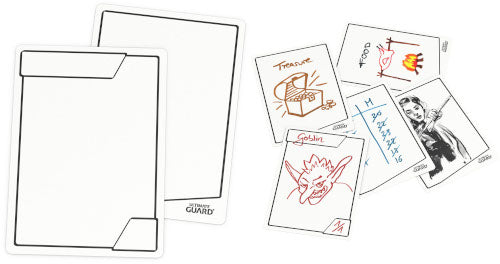
Missing the correct Zombie-Token to prepare your lethal attack? Need something to count the cards which have already been played during the game? Or just doodling while your opponent takes forever for his turn? Here you go! With Multi Tokens, you will always have the right answer.
Customizable and reusable in combination with dry-erase markers, these standard sized tokens are made of high-quality playing cardboard for long-lasting durability and multiple uses. Scribble, draw, count and erase with these Ultimate Guard Multi Tokens.
Features: • Use a wet-erase marker for more resistant scribbles or if you want to sleeve your tokens. To reuse, just clean them with a wet towel or add a few drops of cleaning alcohol. • Use as token, score pad, note pad, scribble board and more. • Rigid, cardboard material.
Contents: • 25 x Multi Tokens
Couldn't load pickup availability
We’ll email you as soon as this option is back in stock.
Thistle Tavern isn't just a shop; it's a hub for the TCG community across Scotland. Run and operated by active players, we are dedicated to building and supporting local gaming scenes in Aberdeen and Edinburgh. Every product we sell helps fund local events, player meetups, and the growth of the games we love. When you shop with us, you're supporting a team that's as passionate about the local meta as you are.
Player-Owned & Operated
Supporting Scottish Metas
Community-Driven Events
Premium TCG Accessories
Protecting your collection is as important as building it. At Thistle Tavern, we use the same Ultimate Guard, deck boxes, and sleeves we sell. We ensure our players in Aberdeen and Edinburgh have access to the highest quality accessories to keep their decks safe during every local tournament.
Tournament-Grade Accessories
Tested by Active Players
Premium Protection Selection
Community Verified
Our commitment to the local gaming scene is reflected in our reviews. See why players across Scotland trust us.
4.79 ★ (299)
Verified
Choosing a selection results in a full page refresh.
Opens in a new window.
PayPal Pay Later Messaging
Step 1: Choose message placement
Click the button below and then hover over your page to select a placement.
Step 2: Paste and save
You have copied the placement for the Product Page.
Go back to the App Embeds section, and in the Paypal Advanced Settings, paste the copied value into the
Product Page field and click the 'Save' button in the top right corner.